What Is the Optimum Bid?
The optimum bid is the calculated bid amount used by Scale Insights to help keywords reach your Target ACOS based on their historical performance.
Scale Insights considers historical keyword conversion data when adjusting bids. Depending on your campaign type, product setup, and keyword performance, you can use one of three formulas to calculate the optimum bid.
Overview: Three Ways to Calculate the Optimum Bid
Scale Insights uses three calculation methods:
Calculation method | When to use it |
|---|---|
Revenue Per Click (RPC) | When the keyword's revenue and clicks are available and the RPC method applies. |
Associated ASIN Selling Price | When the calculation uses the associated ASIN's selling price, target ACOS, and conversion rate. |
Keywords Without Sales | When the keyword has clicks but no attributed sales. |
Note: Headline Search Ads (HSA), also known as Product Collection Ads under Sponsored Brands, use the RPC-based calculation described in Method 1.
1. Calculate the Optimum Bid Using Revenue Per Click (RPC)
Revenue Per Click (RPC) measures how much revenue a keyword generates per click. This method uses the keyword's actual revenue and clicks to estimate its optimum bid.
Formula 1
Optimum Bid = (Keyword Revenue / Clicks) * Target ACOS
Example
Suppose a keyword has generated $300 in revenue from 100 clicks, and your target ACOS is 30%.
Here's how the Bidding rule calculates the optimum bid:
Step 1: Calculate Revenue Per Click (RPC).
$500 ÷ 100 = $5.00
Each click generates an average of $5.00 in revenue.
Step 2: Multiply RPC by Target ACOS.
$5.00 × 30% = $1.50
Optimum bid: $1.50
When Is This Method Useful?
The RPC method can be useful when your keyword generates revenue from multiple product variations with different selling prices. Because it uses the keyword's actual revenue, it reflects the revenue generated per click rather than relying solely on one associated ASIN's selling price.
This method also applies to HSA/Product Collection Ads under Sponsored Brands, as described above.
How to Enable This Calculation Method
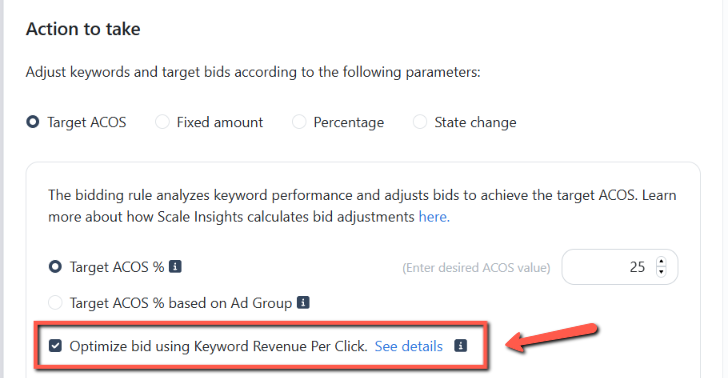
To calculate the optimum bid using Keyword Revenue Per Click (RPC):
Find the Optimize bid using Keyword Revenue Per Click setting.
Enable (check) this setting.
2. Calculate the Optimum Bid Using the Associated ASIN's Selling Price
This method estimates the optimum bid using the associated ASIN's selling price, target ACOS, and keyword conversion rate.
Formula 2
Optimum Bid = Selling Price Target ACOS (Orders / Clicks)
The ratio of orders to clicks represents the keyword's conversion rate for this calculation.
Example
Suppose your product sells for $20, your keyword has generated 50 clicks and 10 orders, and your Target ACOS is 30%.
Here's how the Bidding rule calculates the optimum bid:
Step 1: Calculate the target ad spend per order.
$20 × 0.30 = $6.00
Step 2: Calculate the conversion rate.
10 ÷ 50 = 20%
Step 3: Calculate the optimum bid.
$6.00 × 0.20 = $1.20
The calculated optimum bid is $1.20.
When Is This Method Useful?
This method is useful when the associated ASIN's selling price is the basis for the calculation.
Keep in mind that the associated ASIN's selling price may not match the actual selling price of the product variation purchased by a shopper. If a keyword generates sales across variations with different prices, the RPC method may better reflect the keyword's actual revenue per click when that method applies.
How to Enable This Calculation Method
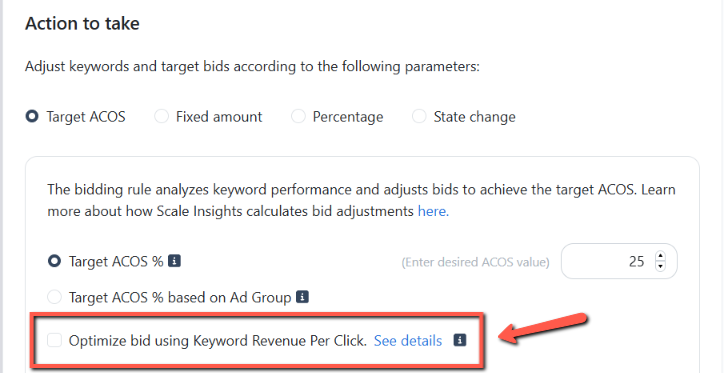
To calculate the optimum bid based on the associated ASIN's selling price:
Find the Optimize bid using Keyword Revenue Per Click setting.
Disable (uncheck) this setting.
3. Calculate the Optimum Bid for Keywords Without Sales
When a keyword has clicks but no orders, you cannot calculate its conversion rate from sales. Instead, for supported campaign types, Scale Insights can use the associated product's selling price, Target ACOS, and the number of clicks to calculate the optimum bid.
Formula 3
Optimum Bid = Selling Price * Target ACOS / Clicks
Example
Suppose your product sells for $20, your keyword has 10 clicks and no orders, and your Target ACOS is 30%.
Here's how the Bidding rule calculates the optimum bid:
Step 1: Calculate the allowable advertising spend per order.
$20 × 30% = $6.00
Step 2: Divide by the number of clicks.
$6.00 ÷ 10 = $0.60
Optimum bid: $0.60
Now, suppose the keyword receives two additional clicks without generating any orders.
$6.00 ÷ 12 = $0.50
The calculated optimum bid decreases from $0.60 to $0.50 because the allowable spend per order is spread across more clicks without a sale.
Important
This formula is not suitable for HSA/Product Collection campaigns, which use the RPC-based formula. If an HSA keyword has no sales, Scale Insights cannot calculate its RPC from keyword revenue, so its bid may remain unchanged, see Why are Bids Unchanged on HSA?
Why Might the Keyword Bid Remain Unchanged?
The calculated optimum bid does not always mean the actual keyword bid will change immediately.
Scale Insights will not change the keyword bid when both of the following conditions are met:
The keyword's spend is less than Selling Price * Target ACOS.
The current bid is lower than the calculated optimum bid.
Example
Suppose:
Product selling price: $20
Target ACOS: 30%
Keyword spend: $4
Current bid: $0.40
Calculated optimum bid: $0.60
The spending threshold is: $20 × 30% = $6.00
The keyword has spent $4, which is below the $6.00 threshold, and its current bid of $0.40 is already lower than the optimum bid of $0.60.
Since both conditions are met, Scale Insights will leave the current bid unchanged.
In this situation, the keyword has not yet spent enough to reach the target ad spend per order, and its current bid is already below the calculated optimum bid. Therefore, the calculation alone does not trigger an increase.
Important
The optimum bid is a calculated reference point. The final bid adjustment also depends on the applicable bidding rule and its settings.
Important Considerations
Before interpreting the calculated optimum bid, keep these points in mind:
The calculation method matters. RPC uses keyword revenue and clicks, while the associated ASIN method uses selling price and conversion rate. Keywords without sales use a separate calculation.
The optimum bid is not a performance guarantee. Actual results depend on factors such as conversion rate, traffic, competition, and changes in product performance.
The final bid may differ from the optimum bid. The applicable bidding algorithm and rule settings influence how the final bid is determined.
Check the applicable rule when a bid does not change. Review the current bid, keyword performance, and rule conditions to understand the result.
For more information about how bidding algorithms work, see 2 Different Approaches to Bidding Rules.