Account with rebates
$0 FBA fees can be due to rebates.
When rebates are applied to an account, Amazon offsets the applicable fees on subsequent orders until the rebate amount has been fully used.
Rebates are applied automatically to the next fulfillment fee transaction that is charged to the Seller's account. If a rebate was applied against the FBA pick and pack fee, it will appear as a reduced fee. If the rebate covered the entire fulfillment fee, the line item will not appear for the selected order payment.
Orders with deferred transaction status
An order's transaction may be marked as Deferred when Amazon has not yet released the transaction for payment. This can happen, for example, while an order is awaiting delivery or pending buyer payment.
While a transaction is deferred, Amazon may not yet have finalized and released the associated financial information. As a result, the Amazon API may not return the fulfillment fee data for that order yet.
Once Amazon releases the transaction, its status changes from DEFERRED to DEFERRED_RELEASED, and the transaction becomes available as a released financial transaction.
How to check if the order is under deferred status:
In Amazon Seller Central:
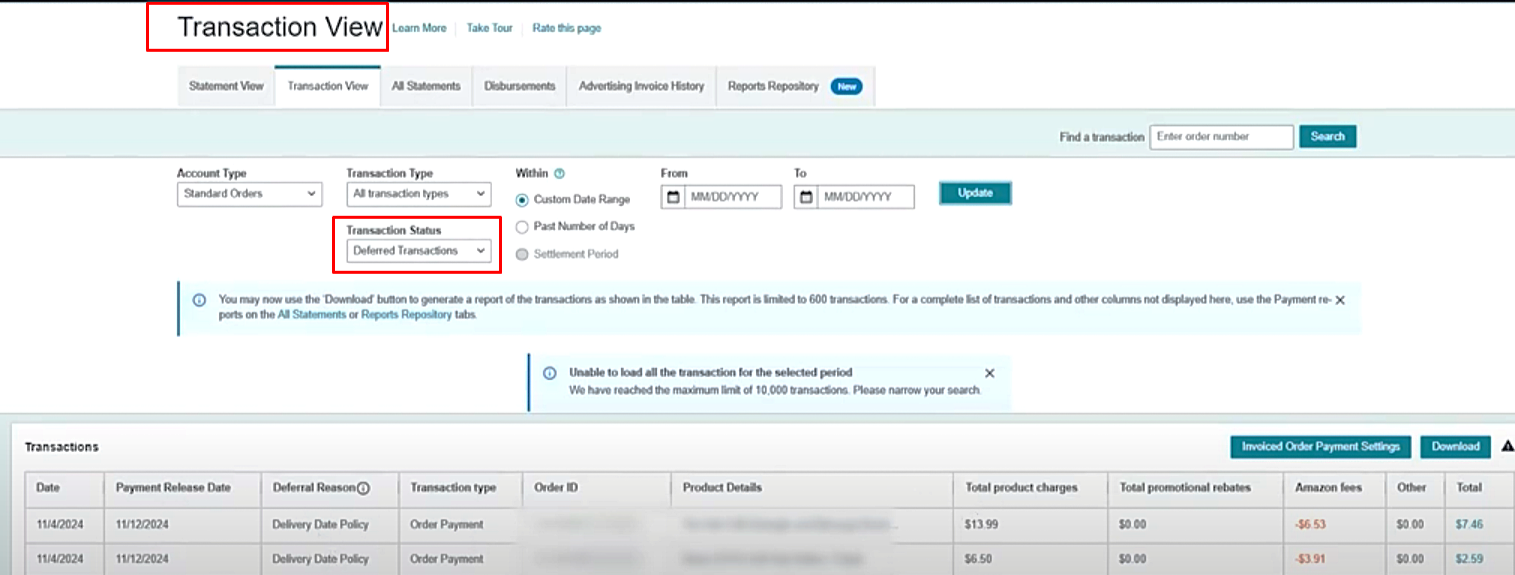
- Go to Transaction View.
- Select Deferred Transactions from the Transaction Status dropdown.
- Click Update.
- Check the transaction's deferral reason and expected release date.
If the order is still deferred, the FBA fee may not be available yet. You can check again after the transaction has been released. Amazon notes that financial data may not include orders from the last 48 hours, so some recently placed orders may also take time to appear.
This view shows the deferral reasons and expected release dates.