The Hourly Bid Adjustment is a Dayparting Rule feature that adjusts keyword bids by hour to optimize performance.
It gives you greater control over ad spend and performance throughout the day by allowing you to:
- Increase bids during high-converting hours
- Reduce bids during lower-performing hours without fully pausing traffic
How hourly bid adjustment works
An hourly bid adjustment modifies a keyword's current base bid by a percentage set for a specific hour.
Positive bid adjustment
If a keyword has a base bid of $1.00 and the hourly bid adjustment for 1:00 PM is +10%, the system will calculate:
1.00×(1+0.10)=1.10
So, the bid becomes $1.10 during that hour.
Negative bid adjustment
If the same keyword has a base bid of $1.00 and the hourly bid adjustment for 8:00 PM is -20%, the system will calculate:
1.00×(1−0.20)=0.80
So, the bid becomes $0.80 during that hour.
Each hour is calculated independently using the base bid and does not carry over to the next hour.
For example, if a keyword has a base bid of $1.00:
- At 1:00 PM, no adjustment is configured, so the Amazon bid remains $1.00.
- At 2:00 PM, a +20% adjustment is applied, resulting in an Amazon bid of $1.20.
- At 3:00 PM, a -10% adjustment is applied, resulting in an Amazon bid of $0.90.
How to set hourly bid adjustments
Navigation: Dayparting Rule > Create/Edit Rule
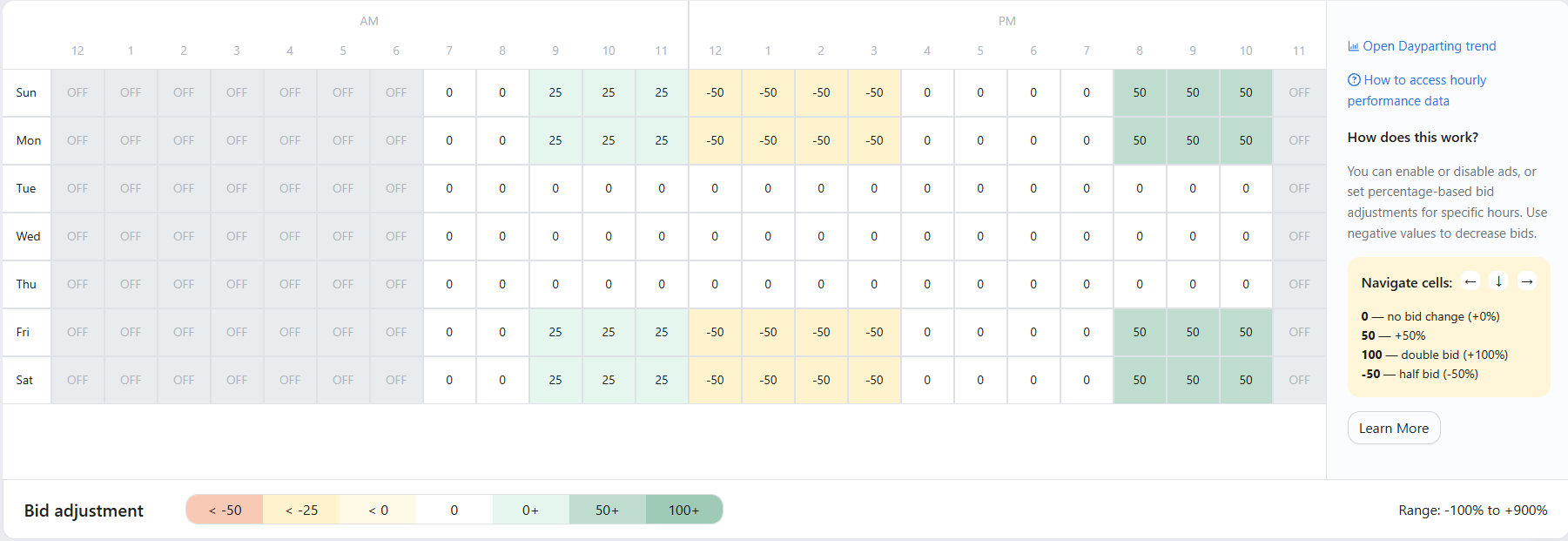
Enter the desired percentage adjustment for each hour of the day.
- Enabling an hourly adjustment also sets the ad group’s status to Enabled for that hour.
- A cell with 0% means no keyword bid change, but the ad group status change will still take effect for that hour.
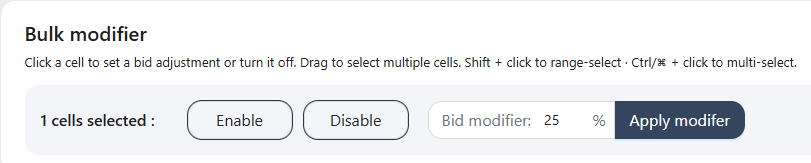
You can use the Bulk Modifier to enable/disable ad group status or apply bid percentage adjustments across multiple hours at once.
Drag to select multiple cells for faster bulk editing across hours, rows, or columns.
What resets hourly bid adjustments
Hourly bid adjustments are cleared whenever the base bid is updated from any source.
1. When a Bidding rule updates the bid
Bidding rules always calculate using the current base bid, not the hourly-adjusted bid.
When a bidding rule updates a bid, the hourly bid value is reset and recalculated during the next scheduled hourly update.
For example:
A keyword has a base bid of $1.00 and a +10% hourly adjustment.
Before a bidding rule executes:
- Base bid: $1.00
- Hourly adjusted bid: $1.10
If a bidding rule later increases the bid by 20%, the calculation uses the base bid of $1.00, not the adjusted bid of $1.10.
After the bidding rule runs:
- The new base bid becomes $1.20
- The hourly adjustment is cleared
- Amazon receives a bid of $1.20
Note: Only actions that update the bid will reset hourly bid adjustments; keyword state changes do not trigger a reset.
2. When a bid is manually updated in Scale Insights
When you manually update a bid in the Ads Insights Keywords page or via Bulk Operation, the new value becomes the base bid, and any existing hourly bid is cleared.
For example, if you update the bid to $1.30:
- The new base bid becomes $1.30
- The hourly adjustment is cleared
- Amazon receives a bid of $1.30
3. When a bid is updated in Amazon or a third-party tool
When a bid is changed directly in Amazon Ads Console or through other third-party tools, Scale Insights syncs the latest value during the next data refresh.
The synced bid becomes the new base bid, and the hourly bid adjustment is cleared.
For example, if the bid is updated to $1.20 in Amazon:
- Scale Insights updates the base bid to $1.20
- The hourly adjustment is cleared
- Amazon receives a bid of $1.20
When hourly bid adjustments do not apply
Paused Campaign
- All rules, including the Dayparting rule's hourly bidding, do not run on paused campaigns.
Paused Ad Group
- Hourly bid adjustments are not applied while an ad group is paused.
- Once re-enabled, hourly bid adjustments resume according to the schedule.
Paused Keyword
- Hourly bid adjustments are not applied while a keyword is paused.
- Adjustments resume once the keyword is re-enabled.
Note: If no ad group status changes occur during a scheduled run, only bid adjustments are applied and recorded in the change log.
How to preview bid changes
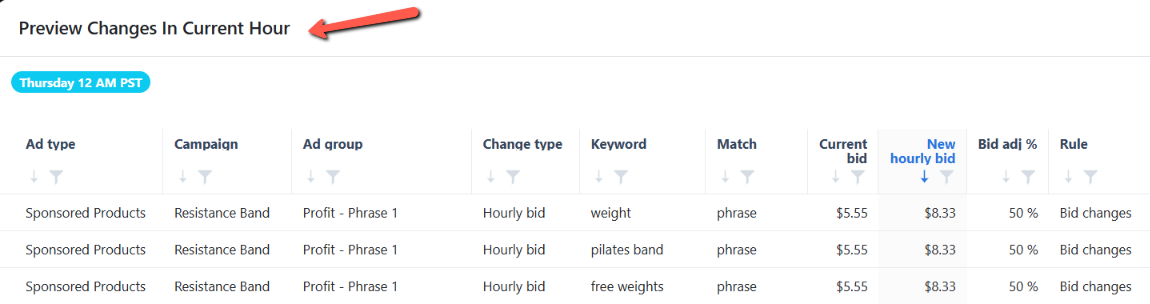
Use the Preview feature to see the exact bid values that would be applied if the Dayparting rule were executed at the current time.

How hourly bid adjustments appear in Ads Insights
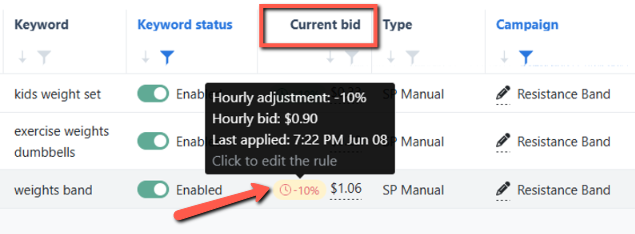
For keywords with an active hourly bid adjustment, the Ads Insights Keywords Performance page displays the base bid as the current bid.
The hourly-adjusted bid is not shown directly; instead, a chip indicator appears next to the base bid.
The indicator tooltip displays the following information:
- The configured hourly bid adjustment percentage
- The calculated hourly bid
- The timestamp of the most recent hourly bid update
Click the indicator to open the rule edit page and review or modify the configuration.