Ad Group Signals and Scale Optimizer
Ad Group Signals gives you granular control over the types of ad groups to target when generating recommendations.
For example, you can recommend different optimization strategies based on the ad group structure, such as:
- Optimizing top of search placement for Ads with 900% TOS
- Optimizing organic ranking for Single Keyword Campaigns with only 1 exact match keyword
- Optimizing for profits for ads with 0% placement and more than 5 keywords
By applying Ad Group Signals, you control which ad groups are included in optimization decisions.
Why Ad Group Signals Matter
Ad Group Signals help ensure that:
- Recommendations align with your campaign strategy
- Optimization actions apply only to compatible ad groups
- Automation remains intentional and predictable
Example:
A ranking optimization recommendation may appear only for ad groups that:
- Are keyword-targeted
- Use exact match keywords
- Don’t use placement modifiers
If an ad group doesn’t meet all the defined conditions, the recommendation won’t appear, ensuring you only see suggestions that truly apply.
How Ad Group Signals Work with Scale Optimizer
When Ad Group Signals are enabled:
- Scale Optimizer first evaluates the selected Sponsored Ad type.
- The selected Ad Group Signals are applied as filters.
- Only ad groups that meet all signal criteria are included in recommendations.
- Ad groups that do not match the signal conditions are excluded from optimization actions.
Conflicting Signals
You can select multiple Ad Group Signals for the same Sponsored Ad type. However, if any selected signals have conflicting characteristics, an error will occur.
For example, a signal that allows Keywords only cannot be combined with a signal that allows Products only.
How Signals Are Applied in Scale Optimizer
Signals are assigned at the recommendation level inside Scale Optimizer.
To attach signals:
- Go to Scale Optimizer > Manage tab
- Create a new recommendation or edit an existing one
- Add the relevant SP, SB, or SD signals
- Save
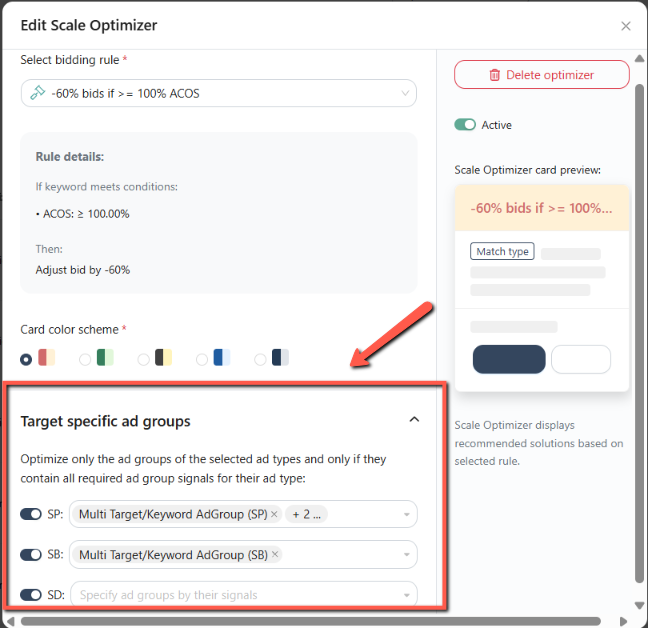
Each recommendation can include:
- Sponsored Products (SP) Signals
- Sponsored Brands (SB) Signals
- Sponsored Display (SD) Signals
Only matching ad groups will qualify.
Signals are always evaluated within the same ad type:
- Sponsored Product (SP) Signals apply only to ad groups within SP campaigns.
- Sponsored Brand (SB) Signals apply only to ad groups within SB campaigns.
- Sponsored Display (SD) Signals apply only to ad groups within SD campaigns.
In Summary
Ad Group Signals act as guardrails for Scale Optimizer, making sure the right recommendations appear for the right ad groups, every time.
The result is automation that’s smarter, safer, and easier to trust.