Create & Edit an Ad Group Signal
You can create a new Ad Group Signal from the Ad Group Signals settings page.
Navigation: Main Dashboard > Scale Optimizer > Customize > Manage Signals
Scale Insights includes preset Signals for common ad group structures, so you get value immediately.
You can also create or edit Signals if your strategy requires more control.
Step 1: Choose the ad type
All available criteria adapt to the selected ad type.
Step 2: Define the criteria
Depending on the ad type, you can set criteria such as:
- Bidding strategy
- Use of placement modifiers
- Targeting type (e.g., keywords, products, auto)
- Number of targets
- Keyword Match type
Step 3: Name, color-code, and save
Each saved signal becomes visible across supported features.
Step 4: Edit & refine
You can edit the criteria and settings of both preset and custom signals.
Note:
Deleting a signal removes it from any Scale Optimizer recommendation filters but does not delete the recommendation itself.
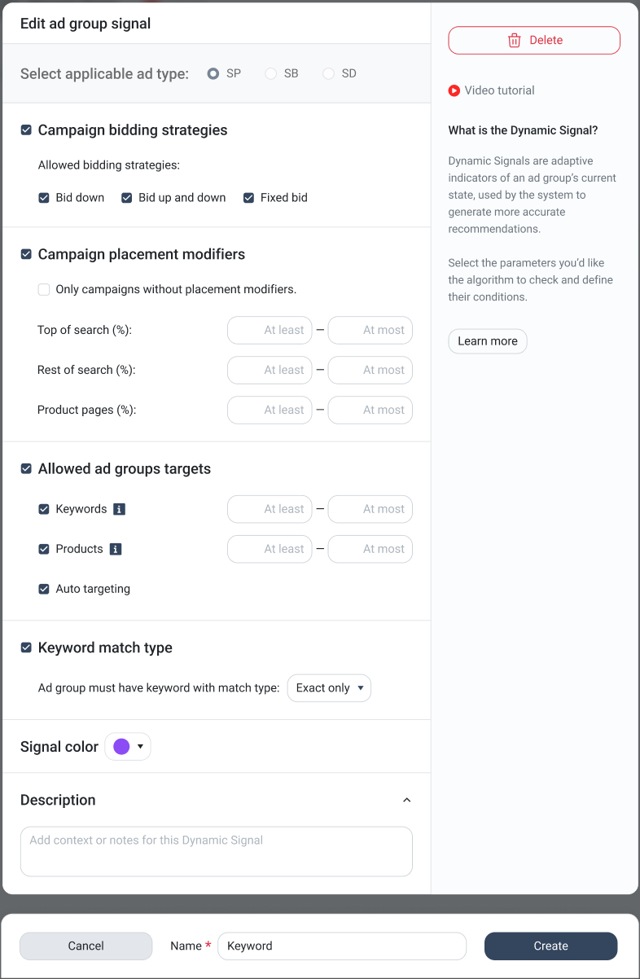
Edit details within the Ad Group Signal Settings page.
Best Practices for Managing Ad Group Signals
- Use descriptive naming to avoid confusion.
- Avoid selecting conflicting signals for the same Sponsored Ad type.
- Start with simple signals and refine over time.
- Review signals periodically to ensure they align with your current campaign structure.