A Bidding Rule automates keyword and product-target bid adjustments based on your advertising goals and performance criteria. You can define conditions and choose actions to optimize bids or manage keyword activity without making manual adjustments.
Navigation: Automation → Bidding Rule
For example, you can create multiple Bidding Rules to handle different keyword performance scenarios.
One rule can prioritize high-converting keywords, another can reduce bids for low-converting keywords with sufficient spend, and a third can adjust bids for keywords that meet a minimum click threshold.
Each rule can have its own Target ACOS, bid cap, and suggested bid strategy.

What Actions Can a Bidding Rule Perform?
You can choose a Bidding Rule action based on what you want to achieve.
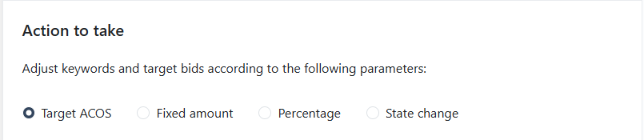
The available actions include:
1. Adjust Bids Based on Target ACOS
Use this action when you want to adjust bids toward a specified Target ACOS. The algorithm considers keyword performance and the selected bidding approach to calculate the desired bid.
Example: If a keyword's ACOS is above your target, the rule may reduce its bid to help improve advertising efficiency. If the keyword has strong conversion performance, the algorithm may calculate a higher bid to support additional sales opportunities, depending on the bidding approach and available data.
Choose Target ACOS-based adjustments when your goal is to align bids with your advertising efficiency target.
Learn more: 2 Different Approaches to Bidding Rules.
2. Adjust Bids by a Fixed Amount or Percentage
Use this action when you want more direct control over how much a bid changes. You can configure a fixed dollar amount or percentage increase or decrease when the rule's conditions are met.
Example: If a keyword has a current bid of $1.00, you can configure the rule to increase the bid by $0.10 or by 10%, depending on your strategy.
This approach is useful when you want consistent, controlled adjustments rather than calculating a bid based on Target ACOS.
Choose fixed-amount or percentage adjustments when you want to control the size of each bid change.
3. Pause or Enable Keywords
Use this action to control keyword activity based on performance criteria.
Example: You can configure a rule to pause keywords that have spent a specified amount without generating orders. You can also configure a rule to enable paused keywords when they meet your criteria for reactivation.
Select conditions carefully to avoid pausing valuable keywords due to insufficient or incomplete performance data.
Choose pause or enable when your strategy requires activating or deactivating keywords based on performance.
How Does the Bidding Rule Work?
The Bidding Rule evaluates historical performance, checks the configured conditions, and applies the selected action when the rule qualifies to run.
Step 1: Analyze Historical Performance
The algorithm reviews historical advertising data to evaluate keyword or product-target performance.
By default, the Bidding Rule analyzes 30 days of data and excludes the most recent 2 days to allow Amazon's advertising data to update. These settings can be customized, with up to 365 days of historical data available.

The analysis period affects how the algorithm evaluates performance. Shorter periods respond more quickly to recent changes, while longer periods provide more historical context.
Learn more: How Do Algorithms Analyze Data?
The system aggregates keyword statistics in its own Ad Groups, calculating the ACOS of each keyword.

Step 2: Check the Rule's Conditions
The algorithm checks whether a keyword or product target meets the conditions configured in the assigned rule.
For example, you might configure a rule to reduce bids when ACOS exceeds a specified threshold and the keyword has generated enough clicks or spend to qualify.
The configured conditions determine which targets are eligible for the rule's action.
Step 3: Determine the Action
When a target meets the rule's conditions, the algorithm follows the selected action.
For Target ACOS-based adjustments, it calculates a desired bid based on the selected bidding approach and available performance data.
For fixed-amount or percentage adjustments, it applies the configured increase or decrease.
For pause or enable actions, it changes the keyword's status according to the configured conditions.
Step 4: Apply the Adjustment
For bid adjustments, the rule applies the permitted change according to its configured limits and other applicable settings.
Depending on the action and settings, the applied bid may not immediately reach the calculated optimum. The rule may need multiple executions to move the bid toward the desired amount.
For Target ACOS-based actions, the algorithm will adjust the keyword’s bid to meet the rule’s target ACOS.
 The algorithm calculates how many bids to adjust for each keyword to meet the target ACOS.

For pause or enable actions, the keyword's status changes when the relevant conditions are met.
How Do Gradual Bid Adjustments Work?
For Target ACOS-based bidding, the calculated optimum bid and the new bid applied by the rule are not always the same.
The rule's maximum bid increase and decrease percentages can limit how much the bid changes during each execution.
Example: Reducing a bid gradually
Suppose a keyword has the following settings:
Setting | Value |
|---|---|
Current bid | $2.00 |
Calculated optimum bid | $1.50 |
Maximum decrease per execution | 2% |
Although the calculated optimum bid is $1.50, the rule may reduce the bid gradually instead of applying the entire change immediately.
Assuming the same 2% decrease is applied at each execution and the optimum bid remains unchanged:
Execution | Bid | Change |
|---|---|---|
Initial bid | $2.00 | — |
First execution | $1.96 | -2% |
Second execution | $1.92 | -2% |
Third execution | $1.88 | -2% |
The bid continues moving toward the calculated optimum over subsequent executions, subject to the rule's settings and limits.
Gradual adjustments help prevent abrupt bid changes based on limited or unusually strong performance data. They can also help reduce the risk of lowering bids so aggressively that a keyword loses valuable impressions.

However, reaching the calculated optimum does not guarantee that the keyword will achieve the Target ACOS. Actual performance depends on factors such as clicks, conversions, sales, and advertising costs.
For more details, see How to Calculate the Optimum Bid.
How to Configure a Bidding Rule
Follow these general steps to create a rule that matches your advertising strategy.
Open the Bidding Rule section. Navigate to Automation → Bidding Rule.
Create or select a rule. Choose an existing preset or create a custom rule.
Configure the conditions. Define the performance criteria that determine when the rule should apply.
Choose the action. Select Target ACOS-based adjustments, fixed-amount or percentage adjustments, or a pause/enable action, depending on the options available for your rule.
Set the relevant parameters. Configure the target, adjustment amount, bid limits, or other settings required by the selected action.
Assign the rule. Apply it to the relevant ads or ad groups and monitor the results.
Preview the rule. Check its conditions, priority, and proposed changes using the available preview tools.
Before applying multiple rules to the same targets, review their priorities and interactions to ensure they work together as intended.
Frequently Asked Questions
Does a Bidding Rule guarantee my Target ACOS?
No. Target ACOS guides the bid calculation, but actual ACOS depends on advertising performance, including clicks, conversions, sales, and costs. The rule helps align bids with your target; it cannot guarantee a specific result.
Why doesn't my bid immediately match the calculated optimum bid?
The rule's configured bid increase and decrease limits may restrict how much the bid changes during each execution. As a result, the current bid may move toward the calculated optimum over multiple executions.
Can I use multiple Bidding Rules?
Yes. You can use multiple rules to support different optimization goals. Review their priorities, conditions, and stacking or mutual-exclusivity settings to understand how they interact when a keyword qualifies for more than one rule.
Learn more: Use Case for Stackable Bidding Rules.
How should I choose my historical data settings?
Consider your product's sales volume, performance stability, and desired responsiveness. Shorter analysis periods can react more quickly to recent changes, while longer periods provide more historical context. Excluding recent data can also allow time for advertising data to update.
Learn more: How Do Algorithms Analyze Data?
Key Takeaway
Bidding Rules help you automate keyword and product-target optimization based on your advertising strategy. You can choose to adjust bids toward a Target ACOS, make fixed-amount or percentage changes, or pause and enable keywords based on performance criteria.
Understanding the available actions, rule conditions, and adjustment limits helps you configure automation that supports your goals while maintaining control over how your advertising changes.