What Are Organic and Ads Ranking Conditions?
Organic and Ads Ranking conditions allow you to adjust keyword bids automatically based on where your product appears in Amazon search results.
By considering both organic and sponsored visibility, you can create bidding strategies that support your product's ranking goals while managing advertising costs.
These conditions use two ranking metrics:
Organic Rank: Shows your product's position in Amazon's unpaid search results for a tracked keyword.
Sponsored Product (SP) Rank: Shows your product's position in Amazon's sponsored search placements for that keyword.
A lower rank number indicates a better position. For example, a product ranking #5 appears higher in search results than a product ranking #25.
Why Use Ranking Conditions?
Your bidding strategy can change as your product gains or loses visibility.
For example:
Improve organic visibility: Increase bids for profitable keywords where your product still has a poor organic position.
Optimize advertising costs: Consider reducing bids for keywords where your product already has strong organic visibility.
Maintain sponsored visibility: Keep advertising competitive for keywords where your product has strong sponsored rankings but needs improvement in organic search.
Using ranking conditions alongside performance metrics helps you make more informed bidding decisions rather than relying on ranking positions alone.
Before You Start
Before configuring these conditions, make sure:
Your keyword is tracked: Add the keyword to Keyword Rank Tracker so Scale Insights can retrieve its organic and sponsored ranking data.
Your campaign is supported: These conditions apply only to Sponsored Product exact-match keywords.
Ranking data is available: The Bidding Rule uses the latest available ranking data from today or yesterday, whichever is later and available.
Important: Ranking conditions do not apply to broad-match or phrase-match keywords, ASIN targets, Sponsored Brands, or Display campaigns.
Learn more about tracking your keywords in Keyword Rank Tracker.
How to Configure Organic and Ads Ranking Conditions
You can incorporate organic and SP ranking conditions into your Bidding Rules to determine when keyword bids should increase or decrease.
Follow these steps:
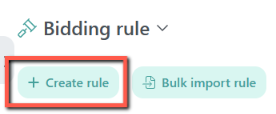
Step 1. Open Your Bidding Rule
Navigate to Automation > Bidding Rule.
Create a new Bidding Rule or open an existing one that you want to modify.
Step 2. Configure Your Ranking Conditions
Locate the Organic Rank and Sponsored Product Rank conditions in the rule configuration.
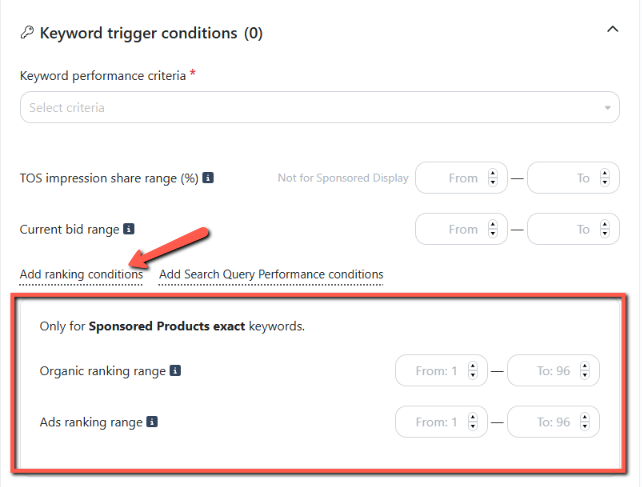
Set your desired ranking criteria based on your advertising strategy.
For example, you can configure a condition to target keywords where your product's organic ranking is outside your desired position.
Step 3. Combine Ranking Conditions With Performance Criteria
Ranking alone doesn't determine whether a keyword is worth investing in.
Consider combining ranking conditions with performance metrics such as ACOS, clicks, orders, or conversion performance.
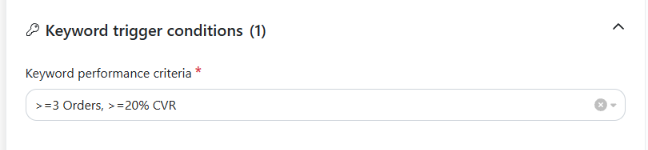
For example, you may want to increase bids only when:
The keyword has a poor organic ranking.
The keyword is generating profitable sales.
The keyword meets your other configured rule criteria.
This helps avoid increasing bids on keywords that have poor performance, even if their ranking positions need improvement.
Step 4. Set The Rule Action
Once you've configured your ranking conditions, select the action you want Scale Insights to perform when the conditions are met.
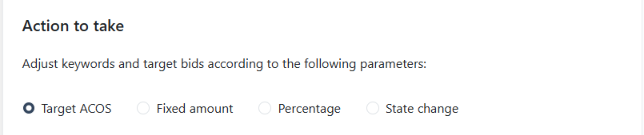
Depending on your bidding strategy, you can choose to:
Increase Bid: Raise the keyword bid by a fixed amount ($) or percentage (%).
Decrease Bid: Lower the keyword bid by a fixed amount ($) or percentage (%).
Pause/Enable Keyword: Automatically pause or enable the keyword based on the configured conditions.
Choose the action that best supports your advertising goals.
For example, increase bids to gain more advertising visibility for profitable keywords with poor organic rankings, or decrease bids when you want to reduce advertising pressure on keywords with strong organic visibility.
Step 5. Review Your Rule Configuration
Once you've configured the conditions and selected the action, review your rule settings and preview the expected bid changes.
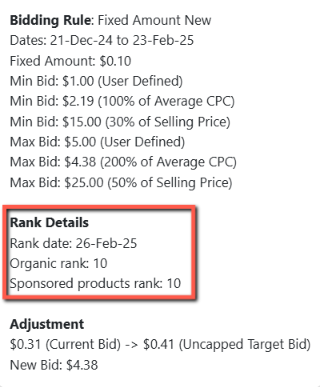
Check the New Bid calculation in the Ad Group Preview to verify the ranking data used by the rule.

Tip: Start with conservative bid adjustments and monitor keyword performance before making more aggressive changes.
Practical Use Cases: When Should You Use Ranking Conditions?
Here are some examples of how you can use organic and sponsored rankings to guide your bidding strategy.
Use Case 1: Improve Organic Visibility
Scenario: Your product has a poor organic ranking for an important keyword, but the keyword is generating profitable sales through advertising.
Metric | Example |
|---|---|
Organic Rank | #35 |
SP Rank | #12 |
Performance | Profitable |
Suggested strategy | Increase bid |
Why?
Your product already has sponsored visibility, but its organic position still needs improvement.
You may increase the bid to strengthen advertising exposure while continuing to monitor whether the keyword contributes to your broader ranking goals.
Use Case 2: Reduce Advertising Pressure on Strong Organic Keywords
Scenario: Your product has achieved a strong organic position for a keyword and consistently appears near the top of organic search results.
Metric | Example |
|---|---|
Organic Rank | #5 |
SP Rank | #8 |
Performance | Strong |
Suggested strategy | Consider reducing bid |
Why?
Since your product already has strong organic visibility, you may choose to reduce advertising pressure and allocate more of your budget to keywords with greater growth opportunities.
However, monitor total sales and advertising performance before making significant bid reductions. Strong organic rankings do not necessarily mean advertising is no longer contributing to sales.
Use Case 3: Maintain Sponsored Visibility While Improving Organic Rank
Scenario: Your product has a strong sponsored position but is still struggling to gain organic visibility.
Metric | Example |
|---|---|
Organic Rank | #40 |
SP Rank | #6 |
Performance | Profitable |
Suggested strategy | Maintain or cautiously optimize bid |
Why?
Your advertising is generating visibility, but your organic ranking hasn't caught up yet.
You may want to maintain your advertising presence while monitoring whether the keyword contributes to organic growth.
Remember: Bid adjustments do not guarantee improvements in organic rankings. Other factors, including sales performance, conversion rate, relevance, and competition, also influence organic search positions.
How to Verify the Ranking Data Used by Your Bidding Rule
Scale Insights allows you to review the organic and sponsored ranking data used when calculating keyword bid changes.
You can check this information in two places:
Option 1. Ad Group Preview
Navigate to Automation > Bidding Rule.
Go to the Ad Group Preview.
Review the New Bid calculation and the ranking positions used.
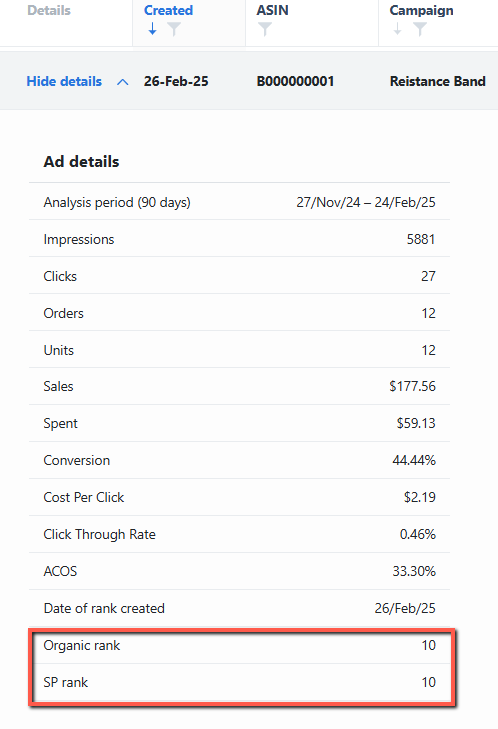
Option 2. Change Log
Navigate to Monitoring > Change Log.
Open the Bidding Rule tab.
Find the relevant keyword adjustment.
Click Details to review the organic and SP ranking positions used during execution.
Troubleshooting: Why Isn't My Ranking Condition Being Applied?
If your Bidding Rule isn't applying the expected bid changes, check the following:
What to check | What to do |
|---|---|
Keyword isn't tracked | Add the keyword to Keyword Rank Tracker. |
Ranking data is unavailable | Check whether the latest ranking data has been retrieved. |
Unsupported targeting type | Confirm that the keyword is a Sponsored Product exact-match keyword. |
Other rule conditions aren't met | Review the keyword's performance metrics and other configured criteria. |
Ranking data doesn't match expectations | Check the Ad Group Preview or Change Log Details to verify the ranking positions used. |
Remember that ranking conditions work alongside your other configured Bidding Rule criteria. Meeting the ranking condition alone does not guarantee that the rule will execute.